Family Tracking Report
Report Parameters
|
Field |
Description |
|---|---|
|
Report Name |
The name of the report. |
|
Start Date |
The start date from when the data must be considered for generating the report. |
|
End Date |
The end date until when the data must be considered for generating the report. |
|
Sort Options |
Select the preferred criteria by which the data in the report must be sorted. Available options include the following:
|
|
Report Options |
Select the preferred option based on which the data will be included in the report. Available options include the following:
|
Sample Report
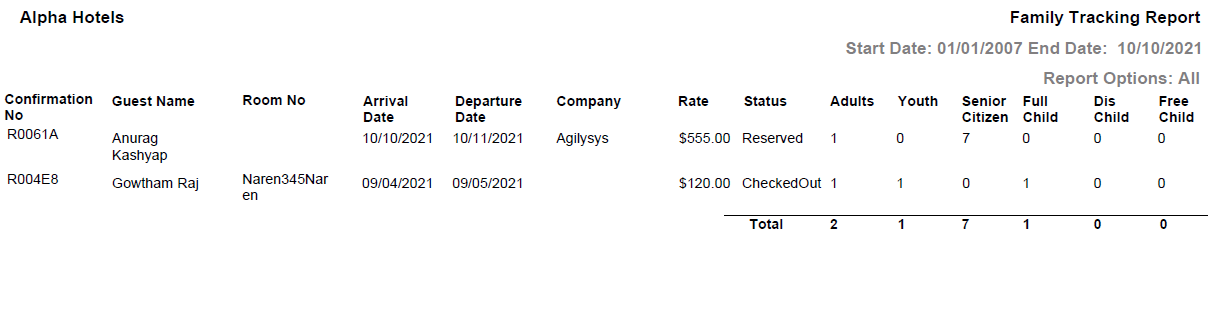
Report Fields
|
Field |
Description |
|---|---|
|
Confirmation No |
The confirmation number of the reservation. |
|
Guest Name |
The name of the guest in the reservation. |
|
Room No |
The room number attached to the reservation. |
|
Arrival Date |
The arrival date of the guest in the reservation. |
|
Departure Date |
The departure date of the guest in the reservation. |
|
Company |
The company to which the guest belongs. |
|
Rate |
The rate of the room attached to the reservation. |
|
Status |
The reservation status - Reserved, InHouse, or Checked Out. |
|
Age Categories |
The split up of the total number of guests in the booking based on their age group. |
|
Total |
The total number of guests from all reservations in the selected date range split by their age group. |